
CapCut APK
Download CapCut APK v16.6.0 for Android in 2026. Edit videos with creative effects, transitions, filters, and powerful editing tools.
McAfee
F-Secure
AdBlock

CapCut video editing makes creating viral content smooth and completely stress-free for everyday creators. Do you spend hours searching for the best software? Editing should feel simple and fun. Modern creators need fast tools to stand out online. Consequently, CapCut changes the entire game for social media posts. Imagine making viral videos in just a few clicks. Millions of creators use this platform daily. It helps you build amazing shorts, reels, and stories easily. You do not need any past editing experience. In this ultimate guide, you will learn everything about this tool. We will explore key features, setup steps, and top tricks. Moreover, learning smart workflow tricks saves tons of time. Choosing a reliable capcut video editor download gives you total freedom on PC or phone. Therefore, let us jump right into the detailed guide now!
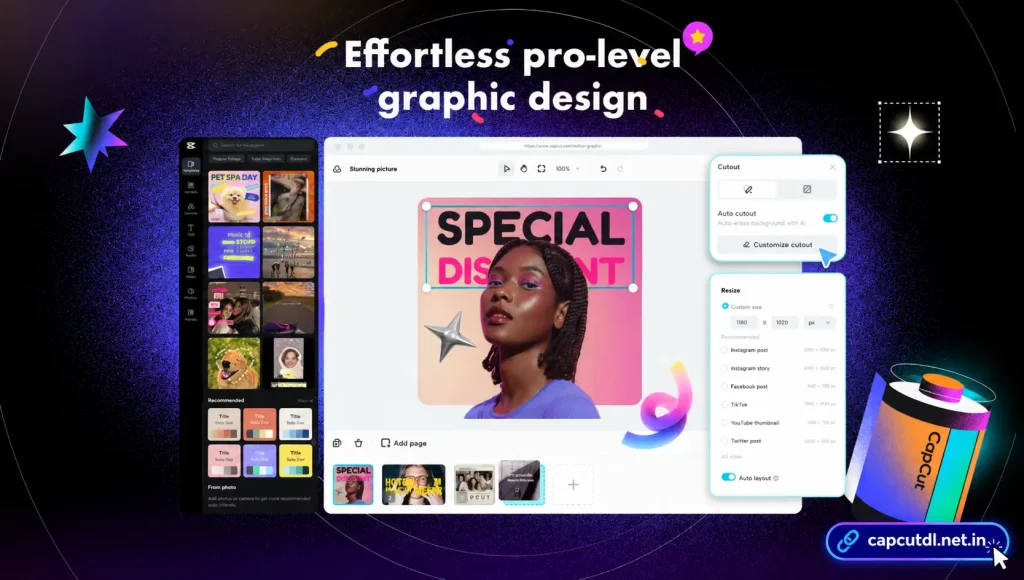
Are you looking for an all-in-one graphic design and clip editing tool? The CapCut – photo & video editor package gives you complete creative control over your social content. In fact, it is not just for moving video clips. You can edit static images, design thumbnails, and create eye-catching posters inside the same app.
Furthermore, the photo editor includes AI background removers, image upscalers, and portrait touch-up tools. You can turn flat photos into dynamic 3D graphic scenes with single tap presets. Consequently, content creators no longer need separate picture editing software.
In addition, you can seamlessly combine edited photos with video layers on a single project timeline. Therefore, choosing CapCut – photo & video editor workflow speeds up your whole creation routine significantly.
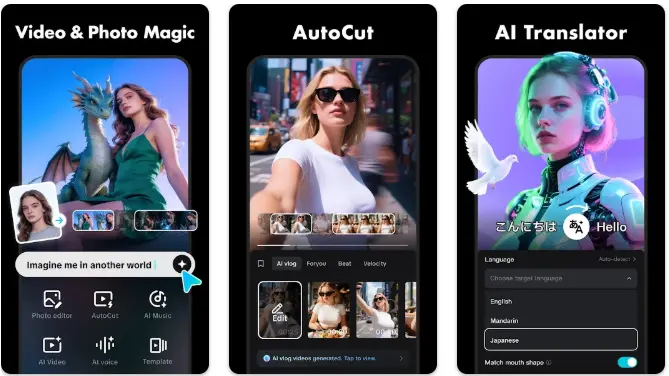
Have you ever wondered why every video looks so good on TikTok? The answer is simple: most creators use the CapCut app. Specifically, it gives you full power right on your phone screen.
You can split clips, add filters, and apply music instantly. In addition, the layout is clean and very easy to navigate. You never get lost in complex menus or hidden settings.
Whether you make daily vlogs or short tutorials, this application works perfectly. As a result, it saves you tons of time every single week. Anyone can start making videos within just two minutes.
Many creators get confused when picking between browser tools and mobile packages. Specifically, the Capcut web portal hosts an online workspace. On the other hand, the capcut download apk is an offline app installed on Android phones.
Here is how both versions compare:
Installation Process
The online portal requires no app installation, while the app apk download file must be installed on your phone.
Storage Requirement
Browser editing uses cloud storage, whereas capacity downloads video assets in the APK version stored directly on local phone storage.
Feature Access
The app download version gives faster access to camera filters, while desktop tools excel at multi-window workspace editing.
Offline Functionality
You must stay connected to use online tools. However, the cap cut editing app download APK allows basic cutting without the internet.
Here are twenty-five detailed features that make CapCut application stand out from all other tools:
Auto Captions Generator
Adding subtitles manually takes hours of hard work. Therefore, using cap cut out speech tools automatically converts spoken audio into accurate text subtitles within seconds. You can choose from various animated text presets, customize fonts, and edit transcription errors quickly.
AI Background Removal
Removing unwanted video backgrounds used to require physical green screens and bright studio lighting. Consequently, automatic detection algorithms allow you to isolate people or key objects instantly with a single tap without any setup.
Natural Text-to-Speech
Converting written text into voiceover audio has never been easier. Furthermore, searching how to download capcut 5-2-0 in india dheerajmehraa style guides shows how easy speech synthesis is. You can turn blog scripts into clear narration clips without recording your own voice.
Smooth Keyframe Animation
Static images and fixed overlays often look boring to viewers. On the other hand, keyframe animation lets you create custom movement paths for text, stickers, images, and video clips easily along your timeline.
Advanced Speed Curve Control
Standard fast-forward or slow-motion edits can feel jarring and unnatural. In addition, using cap cutting videos speed curve tools allows you to create gradual speed ramps for dramatic action clips effortlessly.
Precision Chroma Key
If you film content using green or blue backdrops, this tool offers precise color removal control. You can adjust edge sharpness and eliminate green color spill around subject edges cleanly in seconds.
Dynamic Body Effects
Enhance human movement in your videos using futuristic neon lines and aura glows. Specifically, the cap cut app automatically tracks body shapes in motion and applies glowing outlines or energy bursts without manual drawing.
Trending Viral Templates
Creating fresh video layouts every day can lead to creator burnout. The built-in template library gives you instant access to thousands of trending viral video styles where you simply drop in your personal photos.
Multi-Track Timeline Editing
Complex video projects require multiple layers of media working together simultaneously. Furthermore, the cap cut video editor timeline allows you to stack video clips, overlay images, sound effects, voiceovers, and animated titles cleanly.
4K High Resolution Export
Exporting blurry low-quality videos can ruin your brand reputation quickly. However, standard render settings allow you to export completed video projects in crisp 4K resolution at 60 frames per second.
Smart Video Stabilization
Camera shake can ruin dynamic outdoor shots or fast action clips completely. As a result, the capcut video editing algorithm analyzes handheld video motion and automatically smooths out sudden jolts without expensive gimbals.
Instant Audio Extractor
Finding great background music trapped inside existing video clips is a common problem. Luckily, audio extraction tools allow you to isolate background sound tracks from any saved video file stored on your phone.
Copyright-Free Music Library
Searching for royalty-free background sound tracks across third-party websites is frustrating. Furthermore, searching the integrated sound menu leads to an extensive built-in music catalog organized by genre, mood, and style. Cap Cut download 2026 offers copyright free music.
Retro Glitch and Distort Effects
Adding stylistic visual flair gives your social videos a unique personal personality. You can pick from hundreds of retro VHS overlays, color shifts, and digital camera distortions with a simple tap.
Smart Auto-Cut Tool
Sorting through hours of raw video footage is tedious and time-consuming. Instead, downloading capcut download free packages lets the smart auto-cut engine analyze your raw recordings and trim silent gaps automatically.
Creative Text Animations
Static title overlays fail to capture modern scrolling audience attention. Consequently, entrance and exit animation menus offer motion presets that make words bounce, typewriter, or dissolve smoothly over clips.
Aspect Ratio Presets
Uploading improperly formatted videos leads to awkward black bars on social platforms. Consequently, performing a cap cut download 2025 gives access to canvas preset ratios for TikTok, YouTube, and Instagram.
3D Photo Zoom Effect
Transforming flat two-dimensional portrait photos into dynamic motion scenes creates striking visual appeal. Spatial depth algorithms push background planes backward while moving subject foregrounds forward smoothly.
Cinematic Video Filters
Achieving consistent color grading without professional color wheels can be challenging. However, doing a cap cut app download gives you hundreds of pre-designed cinematic color filters sorted by style, season, and movie genre.
AI Audio Noise Reduction
Background wind rumbles, air conditioner hums, and crowd noise destroy voice clarity. As a result, smart audio tools scan voice tracks and isolate unwanted constant noise signals instantly without altering speech.
Flexible Video Masking
Blending multiple video elements into a single composite frame requires flexible control. In addition, using cap cut editing app masking tools provides linear, mirror, circle, and rectangle shapes to blend video layers softly.
Smart Face & Body Retouch
Portrait videos sometimes require subtle facial smoothing and skin tone correction adjustments. The retouch menu offers natural skin smoothing and teeth whitening tools that enhance appearance subtly.
Canvas Background Customization
Changing aspect ratios often leaves empty black spaces along video edges. Fortunately, searching cap cut official resources shows how the canvas background editor fills empty margins with soft blurs or custom textures.
Multi-Device Cloud Storage
Switching between editing on your phone and continuing on desktop can break workflows. Cloud integration syncs your active project assets, draft timelines, and uploaded media files across connected devices automatically.
Direct Social Sharing
Saving video exports to device storage before uploading creates extra step hassle. Instead, executing a capcut 2025 download allows direct video publishing to TikTok, Instagram, and YouTube.
Are you curious about the newest features added to this software? The CapCut Latest Version brings cutting-edge artificial intelligence upgrades for modern content creators.
Enhanced AI Script-to-Video
Generates full video drafts complete with footage, voiceovers, and captions based on simple text prompts.
Upgraded AI Expansion Tool
Expands video frame boundaries intelligently without stretching original subjects or altering proportions.
Instant Noise Remover
Cleans harsh outdoor background audio and isolates human speech with higher accuracy.
Real-time Collaboration Cloud
Allows multiple team members to leave comments and edit project drafts simultaneously from different locations.
Smart Motion Tracking
Sticks text titles, stickers, and graphic overlays onto moving objects with zero frame lag.
Automated Video Relighting
Adds virtual soft lights, rim lights, and colored ambient lighting to dark camera footage.
Higher Speed Rendering
Reduces project export times by up to 40 percent on modern mobile processors and desktop GPUs.
New Trending Sound Effects
Integrates thousands of new viral audio clips directly synced with social media trends.
Are you thinking about upgrading to the pro version? Furthermore, is the paid capcut pro version worth your money compared to the free download? Here is a detailed breakdown:
CapCut Free Version
- Basic Timeline Editing: Full access to trim, split, reverse, and speed up video clips on multi-track layers.
- Standard Auto Captions: Generates automated subtitles with basic font choices and speech recognition.
- Standard Resolution Exports: Allows video exports up to 1080p resolution at standard bitrates without paying.
- Core Effects & Filters: Includes thousands of free transition effects, color filters, and copyright-free background music tracks.
- Ending Watermark Removal: Lets users delete the default closing logo slide for free before rendering video.
- Basic AI Cutout: Removes solid backgrounds and simple green screens using manual color picker tools.
- Limited Cloud Storage: Provides small initial cloud storage space for basic project file backups across devices.
- Free Social Sharing: Direct one-tap video publishing straight to TikTok, Instagram Reels, and YouTube Shorts.
CapCut Pro Version
- Advanced AI Camera Tracking: Tracks moving subject camera paths with high precision for complex motion effects.
- Premium AI Vocal Isolation: Isolates background music from voice tracks cleanly with single tap studio controls.
- 4K Ultra HD Exports: Unlocks high bitrate 4K video exports with customized frame rate controls up to 60fps.
- Exclusive Pro Effects: Accesses hundreds of premium transition templates, glowing body effects, and AI filters.
- Smart Relighting Tools: Adds custom studio lighting setups and dynamic color glows onto video subjects.
- Advanced AI Body Retouch: Offers detailed facial structure editing, digital makeup presets, and body reshaping tools.
- Expanded Cloud Storage: Grants up to 100GB of secure cloud storage to save heavy raw video footage online.
- Priority Server Rendering: Renders complex visual effect files faster through dedicated high-speed cloud processing servers.
Are you ready to download the most flexible video maker today? Naturally, the official download CapCut options cover every single device you own. You can work on mobile, tablet, or desktop smoothly.
Why should you choose this specific program over older editors? First, it costs absolutely nothing to start creating content. Second, it offers modern AI features built directly into it.
You do not need to buy expensive third-party plugins anymore. Instead, everything you need lives inside one single package. Let us see how you can get it set up on your primary devices.
Do you want to install this application on your personal Android device? Naturally, getting the capcut app download for android or capcut pro download setup takes less than two minutes. Mobile editing allows you to create clips on the go anywhere.
You can edit videos while riding the bus or resting at a cafe. In addition, the mobile interface feels natural and super responsive to touch gestures.
Below are the exact steps to get this app onto your Android phone safely:
- Open your phone settings and enable “Install from Unknown Sources” if using a capcut download apk pro file.
- Open the Google Play Store or trusted app store on your device.
- Search for “capcut app download” or “capcut pro apk download” in the top search bar.
- Tap on the Install or CapCut APK download button clearly shown on screen.
- Wait for the file to finish downloading completely.
- Open the installer package and follow the on-screen prompts.
- Launch the installed app and grant necessary media permissions.
Editing on a large computer screen gives you total control over every single detail. Specifically, choosing CapCut PC allows you to use keyboard shortcuts and view timeline tracks clearly. Computers render complex effects much faster than small mobile phones. Therefore, you can handle heavier 4K footage without experiencing annoying lag or frame drops.
Here are the step-by-step instructions to install this software on your desktop system:
- Open your official desktop app store or native marketplace.
- Search for the desktop edition in the primary application store.
- Save the setup installation file to your desktop folder.
- Double-click the installer executable file to begin installation.
- Agree to the terms of service agreement prompt.
- Click “Install Now” and wait for progress to hit 100 percent.
- Open the software, log in, and start editing projects.
Do you record all your videos using an Apple iPhone or iPad device? The CapCut for iPhone version is tailored to maximize your phone hardware power.
It handles high-frame-rate videos without consuming battery life unnecessarily fast. Consequently, colors look crisp, and exports run smooth on iOS screens.
Follow these easy steps to get the app onto your iPhone right now:
- Unlock your iPhone and open the official Apple App Store app.
- Tap the search icon located at the bottom right corner.
- Type “capcut iphone” or “capcut app” into the search bar.
- Locate the official app icon created by ByteDance.
- Tap the “Get” button to initiate app downloading.
- Confirm installation using your Face ID or Apple account password.
- Find the app on your home screen and open it.
Starting your first video project feels super simple. First, tap on the New Project button on your home screen of CapCut official. Select video clips from your gallery and tap add. Your clips will lay out smoothly along the bottom timeline.
Next, the drag clip ends to trim unwanted parts. Tap the Text icon to generate auto captions or add titles. Apply a trending filter or transition between clips. Finally, tap the export arrow at the top right corner to save your high-quality video!
How does this application compare against VN Video Editor? Both are top-tier mobile tools, but they cater to slightly different editing styles. Here are eight specific points for each software:
CapCut Android
- Automated Subtitles: Features accurate automatic caption generation across dozens of global languages instantly.
- Viral Preset Library: Offers direct access to thousands of trending social templates updated daily.
- Smart AI Cutout: Isolates subjects from complex backgrounds cleanly without requiring physical green screens.
- Built-in Text Effects: Includes hundreds of pre-animated typography styles, bubble texts, and motion titles.
- Native Desktop Apps: Provides fully synchronized desktop editing software for Windows and Mac systems.
- Speed Ramping Presets: Offers easy speed curve templates designed specifically for short action clips.
- Direct Social Publishing: Connects seamlessly with primary social accounts for instant video uploads.
- Pro AI Relighting: Features artificial intelligence tools to fix poor video lighting conditions artificially.
VN Video Editor
- Clean User Interface: Displays a streamlined visual interface without intrusive pop-up ads or complex menus.
- Precise Curve Control: Provides superior manual speed curve adjustment handles for custom slow-motion edits.
- Custom LUT Support: Allows creators to import custom color lookup tables (.cube files) for color grading.
- Advanced Keyframing: Offers highly flexible manual keyframe placement with visual easing curve graph controls.
- Multi-Track Audio Mixer: Displays detailed sound level meters and independent track volume sliders clearly.
- No Default Outro Slide: Does not attach default ending watermarks to exported video project files.
- Marker Placement Tool: Lets editors place exact timing markers on music waveforms for manual beat syncing.
- Uncompressed Project Sharing: Allows direct project zip file sharing between mobile and desktop editing devices.
Are you trying to decide between this app and InShot? While both are great for mobile creators, their workflows differ significantly. Here are eight unique comparison points for each tool:
CapCut for Android
- Multi-Layer Video Tracks: Supports unlimited video overlay tracks for complex split-screen picture-in-picture clips.
- Free Auto Subtitles: Generates automated video captions for free without forcing paid plan upgrades.
- Advanced Chroma Key: Removes precise background color hues with adjustable intensity and shadow sliders.
- 3D Zoom Effects: Features dynamic depth zoom algorithms that turn static photos into 3D motion scenes.
- Voice Changer Filters: Includes creative audio pitch shift effects, robot filters, and deep voice modifiers.
- Background Noise Removal: Cleans background hums and room echoes from microphone recordings automatically.
- Cross-Device Sync: Backs up editing drafts to cloud storage for access across mobile and desktop apps.
- Text-to-Speech Engine: Converts written text scripts into natural human voiceover tracks in multiple languages.
InShot
- Instant Canvas Framing: Excels at quick aspect ratio adjustments with soft background blur fills for quick posts.
- Simple Photo Collages: Includes dedicated photo editing and multi-frame grid collage creation tools built-in.
- Beginner-Friendly Layout: Features an extremely simple interface that requires zero learning curve for beginners.
- Quick Sticker Layering: Allows easy drag-and-drop animated sticker placement over short social media clips.
- Lightweight Performance: Consumes minimal smartphone memory and runs smoothly on low-end older devices.
- One-Tap Music Import: Quickly extracts background sound files from local device folders without hassle.
- Fast Video Trimming: Perfect for slicing simple clip ends without getting overwhelmed by multi-track layers.
- Affordable One-Time Purchase: Offers a permanent lifetime purchase option to remove ads instead of ongoing subscriptions.
YouCut Video Editor
YouCut is an easy-to-use mobile editing tool designed specifically for quick video creation. It allows users to trim clips, adjust playback speed, and merge multiple video tracks without imposing compulsory background watermarks on exported files. Furthermore, it offers dozens of royalty-free sound effects and filters. It is ideal for creators looking for a straightforward, lightweight editor for basic daily social media edits.
VivaVideo
VivaVideo is a feature-packed mobile application famous for its rich collection of visual transitions, dynamic animated stickers, and creative text templates. It gives users instant access to fun video filters and face effects. Consequently, if you want to explore more options, searching for cap cut editing app download guides helps you compare simple mobile creators with advanced multi-track timelines easily.
PowerDirector
PowerDirector brings desktop-grade editing power straight to mobile devices and tablets. It features accurate chroma key green screen editing, multi-layer video overlay timelines, and precise keyframe motion controls. As a result, creators can build complex cinematic projects effortlessly. In addition, users looking for alternative tools often perform a cap cut video editor lookup to test different visual effects side by side.
Splice Video Editor
Splice is a powerful, high-performance video editor optimized for mobile devices. It offers an intuitive drag-and-drop interface, multi-track audio editing, and precise trimming options. The app makes it simple to sync background music clips directly to video transitions, making it a reliable choice for creators making dynamic travel vlogs or quick highlight reels.
ActionDirector
ActionDirector is specifically built for creators who love recording fast action clips, sports moments, and outdoor adventures. It offers specialized speed ramping curves, precise slow-motion controls, and video color enhancement tools. Moreover, if you want an easy mobile setup, executing a cap cut app download allows you to test action filters and motion stabilization tools across different mobile setups effortlessly.
If CapCut does not meet your editing needs, you can try other video editing apps. Some apps offer simple tools for beginners, while others provide advanced effects and professional controls. Here are some popular CapCut alternatives for Android users.
| App | Best For | Key Features |
| VN Video Editor | Free video editing | Multi-track editing, filters, and transitions |
| InShot | Social media videos | Trimming, music, stickers, and text |
| KineMaster | Advanced editing | Multiple layers, effects, and audio controls |
| Filmora | Creative videos | Templates, effects, and AI editing tools |
| PowerDirector | Professional-style editing | Timeline editing, transitions, and video effects |
| Canva | Quick video creation | Ready-made templates, text, and animations |
Auto Captions Not Working
Check your internet connection speed. Make sure your video voice track is clear and not buried under loud music.
Effects Not Loading
Restart your application and connect to a stable network connection. Web effects require an active connection to download.
No Network Connection Error
Use a secure network connection if the app services face regional server delays in your area.
Are you experiencing issues with recent updates on an older smartphone model? Sometimes, searching for capcut old version, capcut old version apk download, or capcut apk download old fixes compatibility bugs on legacy devices.
In addition, searching for a Capcut download old version file consumes less phone memory. Consequently, it runs smoother on older hardware setups. However, older builds lack new AI features and cloud backup options.
If your device lags frequently, trying a lighter old version file can solve crashes. Always make sure to download old APK files from trusted online sources.
Finding the right video editor can take your content creation journey to an entirely new level. Cap Cut stands out as an unbeatable option for beginners and professional creators alike. It combines user-friendly interface design, cutting-edge artificial intelligence tools, and flexible cross-platform features into one complete editing package. Furthermore, you do not need expensive editing software or complex desktop rigs to make viral content anymore. Whether you want to generate automated captions, apply trending visual effects, or create sharp 4K video exports, this platform delivers outstanding results without charging heavy subscription fees. Therefore, take your video editing skills into your own hands today. Perform your cap cut download, and start creating viral videos effortlessly!